Top Toolbar, Bidirectional Sync & Enterprise Exports
Real-world workflows for Attack Paths, Workspaces, Sync to Studio, CISO STRIDE Report (PDF), Threat Register CSV, OWASP Threat Dragon v2, OASIS SARIF v2.1.0, and .nodemotion.json.
“Security architecture only scales when its outputs plug directly into GitHub Security, Jira, and the CISO's board deck.”
1. Top Toolbar Mechanics: Risk Scoreboard, Attack Paths, Workspaces & Sync
The Threat Modeling Studio top bar provides continuous risk telemetry and one-click synchronization with Architecture Studio:
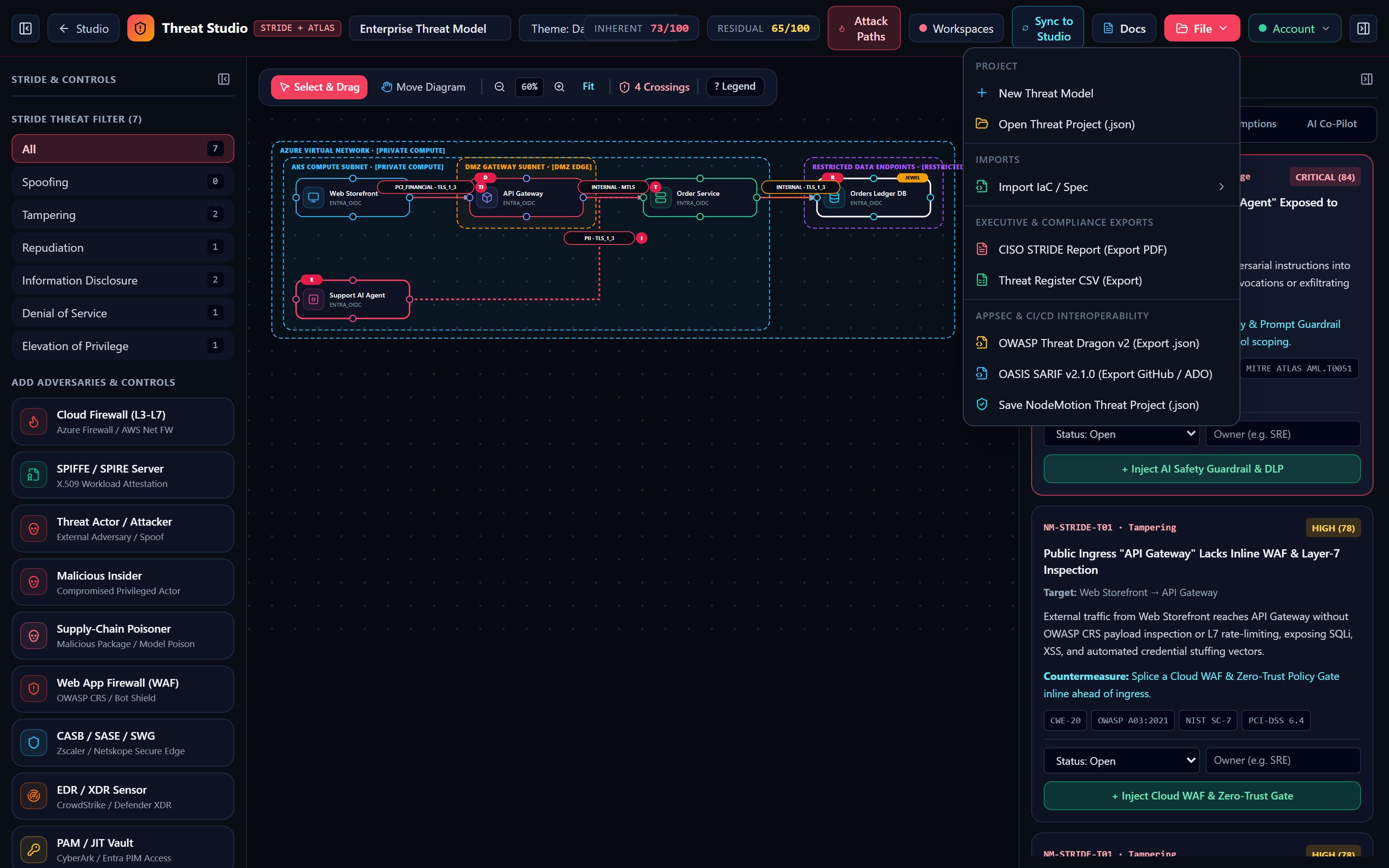
Inherent vs. Residual Risk Score Calculation
runEnterpriseStrideEngine computes both scores across all active findings plus architectural mitigation slots (activeMitigationCount):
- Each active WAF/Zero-Trust, SIEM, or AI Guardrail/DLP adds +2 mitigation slots (
inherent: 76, residual: 12); Vault/PKI/IAM and mTLS connectors add +1 slot each. - Inherent Risk is the mean inherent score across all findings and mitigation slots (capped at 98).
- Residual Risk is the mean disposition-adjusted residual score across all findings and mitigation slots—dropping into the green band (
≤ 35/100) as controls and mitigations are applied.
Bidirectional Handoff (Sync to Studio)
Clicking Sync to Studio serializes the updated nodes (including newly injected WAFs, SIEM collectors, and AI Safety Guardrails), upgraded mTLS edges, and trust zones and navigates back to Architecture Studio so your Word/PDF engineering runbooks automatically include every security control added during threat modeling.
2. Complete Specification of the 5 Enterprise Security Exports
| Export Menu Item | Generator Function | File Extension | Schema & Enterprise Integration Details |
|---|---|---|---|
| 1. CISO STRIDE Report (Export PDF) | openPrintableThreatReport() | .pdf / Print HTML | Renders a dedicated print-styled executive dossier with Inherent vs. Residual Risk KPIs, STRIDE distribution table, Assumptions Register verification status, and full finding cards mapped to CWE, OWASP, NIST 800-53, and ISO 27001. |
| 2. Threat Register CSV (Jira / GRC) | exportToThreatCsv() | -threat-register.csv | RFC 4180 CSV with columns: ID, RuleId, STRIDE, Severity, InherentScore, ResidualScore, Disposition, Owner, Title, Target, Preconditions, AttackScenario, Mitigation, Frameworks, Notes. |
| 3. OWASP Threat Dragon v2 (.json) | exportToThreatDragonJson() | -threat-dragon-v2.json | Produces an OWASP Threat Dragon version: '2.0' document mapping ZoneBox to trust-boundary-box, nodes to actor / store / process cells, edges to flow cells, and findings to embedded cell threats[]. |
| 4. OASIS SARIF v2.1.0 (GitHub Security) | exportToSarifJson() | .sarif.json | Conforms to https://json.schemastore.org/sarif-2.1.0.json with tool driver NodeMotion Threat Studio, rules[], and results[] mapped to error (Critical/High) and warning (Medium/Low). |
| 5. Save NodeMotion Threat Project | handleExport('nodemotion') | .nodemotion-threat.json | Lossless JSON bundle containing nodes, edges, zones, and threatModel (nodePostures, edgePostures, zonePostures, triageRecords, assumptions). |
There Are No Dumb Questions
Candid answers to the skeptical questions every security engineer asks first.
- ▸Every diagram node, edge, and trust boundary stays synchronized across studios.
- ▸1-click countermeasures update both the visual topology and Residual Risk score.
- ▸Export SARIF v2.1.0, Threat Dragon v2 JSON, Jira CSV, and CISO PDFs anytime.