MODULE 04 OF 09•Threat Modeling Studio
Left Panel: STRIDE Filter & Security Controls Palette
How live STRIDE Threat Filter counters work and full reference guide for all 10 Adversaries & Security Controls in the Threat Studio palette.
MODULE 04 · STRIDE FILTER & CONTROLS⏱ 5 min read
“Don't just list vulnerabilities—drop the compensating control onto the wire and watch the risk math prove it worked.”
TL;DR in 15 Seconds:Filter the entire canvas by any STRIDE letter on the left palette, or click Adversaries & Security Controls to auto-splice WAFs, Firewalls, Vaults, SIEMs, and AI Guardrails.
1. How the Live STRIDE Threat Filter Works
The left-hand sidebar of Threat Modeling Studio (STRIDE & CONTROLS) is divided into two operational sections:
- STRIDE Threat Filter (Top Section): Displays live finding counts for All, Spoofing, Tampering, Repudiation, Information Disclosure, Denial of Service, and Elevation of Privilege. Clicking any category pill immediately filters the right-hand Threat Register cards AND isolates the pulsing crimson attack-path highlights on the DFD canvas to only that STRIDE category.
- Add Adversaries & Controls Palette (Bottom Section): Contains 10 specialized security and adversary components. Clicking any button injects that node onto the canvas, wires it into the topology, and immediately re-runs
runEnterpriseStrideEngine.
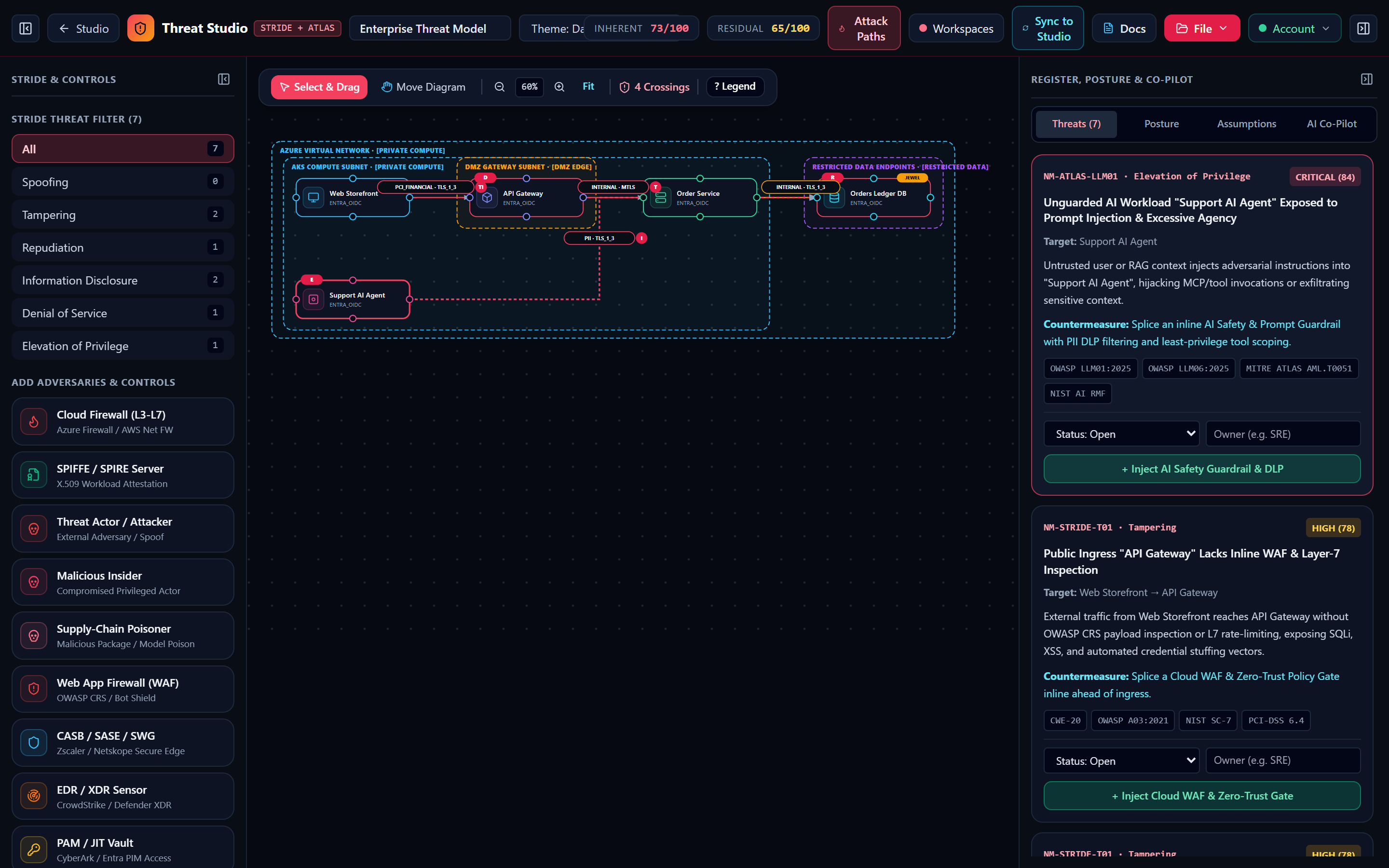
2. Complete Engineering Reference for All 10 Adversaries & Security Controls
| Palette Item | Type Key | Rules Resolved / Triggered | Mitigation Credit | Detailed Architectural & Engine Behavior |
|---|---|---|---|---|
| 1. Threat Actor / Adversary | threat_actor | Triggers NM-STRIDE-S01 (Score 90) | 0 (Adversary) | Placed in untrusted_public with authMode: 'none'. Wiring a threat_actor to any gateway, compute node, or database models an active external attack vector and triggers Critical Spoofing. |
| 2. Cloud WAF (OWASP CRS) | waf | Resolves NM-STRIDE-T01 & NM-STRIDE-D01 | +2 Slots | Sets hasActiveWaf = true across the topology. Eliminates Tampering findings on public ingress edges and volumetric DoS findings on public gateways. |
| 3. Zero Trust Policy Gate | zero_trust | Resolves NM-STRIDE-T01 & NM-STRIDE-D01 | +2 Slots | Acts as an inline context-aware policy enforcement point (PEP) validating device posture and continuous session risk before granting access to private compute tiers. |
| 4. Entra ID / OIDC IAM | iam | Credits Identity & Access Posture | +1 Slot | Sets hasActiveVaultOrPki = true. Models centralized OAuth 2.0 / OpenID Connect token issuance, federated workload identity, and phishing-resistant MFA enforcement. |
| 5. Secrets Key Vault / HSM | vault | Credits Cryptographic Key Custody | +1 Slot | Automatically classified into restricted_data with crownJewel: true and encryptionAtRest: true. Stores Customer-Managed Keys (CMKs) and rotates database credentials. |
| 6. mTLS / X.509 PKI CA | cert_pki | Credits East-West mTLS Mesh | +1 Slot | Models an internal Certificate Authority or SPIFFE/SPIRE server issuing short-lived X.509 workload certificates for mutual TLS pinning. |
| 7. SIEM / SOAR Radar | siem | Resolves NM-STRIDE-R01 (Repudiation) | +2 Slots | Sets hasActiveSiem = true. Provides centralized, tamper-evident audit log collection across all Crown Jewel databases and identity stores, satisfying SOC 2 and ISO 27001 A.8.15. |
| 8. DLP / PII Redaction | dlp | Resolves NM-ATLAS-LLM01 | +2 Slots | Sets hasActiveAiGuardrail = true. Inspects and redacts sensitive PII, PCI cardholder numbers, and credentials before payloads enter LLM context windows or leave egress boundaries. |
| 9. AI Safety Guardrail | ai_guardrails | Resolves NM-ATLAS-LLM01 (Score 84) | +2 Slots | Sets hasActiveAiGuardrail = true. Enforces prompt-injection detection (OWASP LLM01:2025), jailbreak filtering, and least-privilege MCP tool-call authorization (OWASP LLM06:2025). |
| 10. DDoS / Rate Limiter | ddos | Resolves NM-STRIDE-D01 & NM-STRIDE-T01 | +2 Slots | Sets hasActiveWaf = true. Absorbs volumetric L3/L4 floods and enforces per-tenant L7 token-bucket rate limits ahead of public endpoints. |
There Are No Dumb Questions
Candid answers to the skeptical questions every security engineer asks first.
Q:Can I bring my team back and forth between Architecture Studio and Threat Modeling Studio?
A:Yes! Use Threat Model in Architecture Studio to analyze security, and Sync to Studio in Threat Modeling Studio to push every newly spliced WAF, SIEM, or Guardrail back into your architecture runbook.
Q:How do I prove these findings in our CI/CD pipeline?
A:Export OASIS SARIF v2.1.0 from the File menu and upload it to GitHub Advanced Security via github/codeql-action/upload-sarif@v3.
The Sticky-Note Takeaway
- ▸Every diagram node, edge, and trust boundary stays synchronized across studios.
- ▸1-click countermeasures update both the visual topology and Residual Risk score.
- ▸Export SARIF v2.1.0, Threat Dragon v2 JSON, Jira CSV, and CISO PDFs anytime.